





Maintaining your security system ensures it works effectively to protect your property. Skipping routine checks can lead to failures like drained batteries, malfunctioning sensors, or outdated software, leaving you vulnerable. Regular inspections not only minimize risks but also help lower insurance premiums and extend the life of your system. Here’s a quick breakdown of the five key steps:
- Step 1: Visual Inspection – Examine cameras, sensors, and control panels for damage, loose wiring, or dirt. Clean lenses and ensure all components are securely mounted.
- Step 2: Test Devices – Check alarms, motion sensors, cameras, and access controls for proper functionality. Review recordings and ensure all zones are responsive.
- Step 3: Update Software/Firmware – Install the latest updates to patch vulnerabilities and improve system performance. Review logs for suspicious activity.
- Step 4: Check Power Supply – Test main power sources, backup batteries, and generators to ensure uninterrupted operation during outages.
- Step 5: Record and Check Compliance – Document all inspections, confirm compliance with local regulations, and schedule future maintenance.
These steps take 30–60 minutes on average and should be done monthly for homes and quarterly for businesses. Regular maintenance reduces failures by up to 50% and emergency repair costs by 60%. For persistent issues or complex repairs, consult professionals like Sherlock’s Locksmith, who provide 24/7 support and system upgrades.
How Do You Plan Preventive Maintenance For Security Systems? – SecurityFirstCorp.com

Step 1: Check Security Components Visually
Start with a visual inspection. Believe it or not, this simple step can help catch up to 30% of security system issues before they become serious vulnerabilities. It’s all about carefully examining every physical part of your system to spot damage, wear, or anything that might disrupt its performance.
Check Cameras, Sensors, and Control Panels
Take a walk around your property and examine each camera closely. Look for any cracks, dents, or scratches on the housing – these might indicate impact damage. Make sure the cameras are firmly mounted; if any wobble or tilt, the hardware might be loose. Tighten any loose screws or fittings you find. Don’t forget to inspect the camera lenses – scratches here can lead to blind spots or distorted footage.
Next, check your motion sensors and glass break detectors. These devices rely heavily on proper positioning, so ensure they’re undisturbed and free from visible damage. Also, confirm there’s nothing blocking their detection fields.
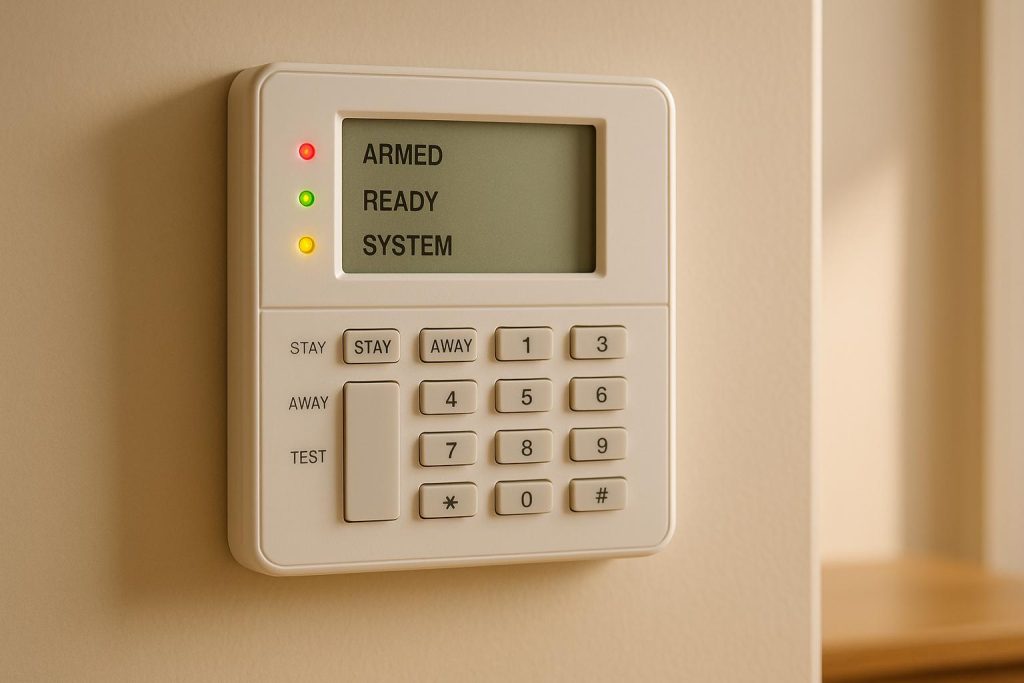
Your control panel deserves just as much attention. Check that all LED indicators are working – non-functioning lights could point to internal problems. Test the buttons for responsiveness, examine the display for any damage, and inspect the wiring for frayed cables, loose connections, or corrosion. Even the mounting hardware matters – loose screws or damaged brackets can cause devices to shift over time. Tighten anything that’s loose, and if the mounting parts are worn out, plan to replace them.
Clean and Maintain Components
Dust and dirt might seem harmless, but they can cause false alarms and even reduce the quality of your footage. A dirty camera lens, for example, can turn crisp footage into a blurry mess. Regular cleaning not only prevents these issues but also helps your equipment last longer.
Use a microfiber cloth to clean camera lenses and sensor surfaces, which reduces the risk of scratches. For stubborn spots like dirt or water stains, apply a small amount of electronics-safe cleaning solution to the cloth – never spray it directly onto the device. Clean gently with circular motions.
Outdoor components need extra care, especially after storms. Check for water damage, debris buildup, or signs of pests. Spider webs are a common culprit that can block a camera’s view, so clear those away. Trim back any vegetation that might obstruct cameras or sensors to keep their field of view clear.
Environmental factors like moisture, dirt, and dust can wear down your equipment faster and clog delicate mechanisms. If your system operates in harsh conditions, consider cleaning more frequently and using protective covers for devices that are exposed.
Step 2: Test All System Devices
Once you’ve completed the visual inspection, it’s time to test each component of your security system. This step helps uncover less obvious issues, like sensors losing sensitivity or recording devices failing to function. The Electronic Security Association reports that over 30% of security system failures result from skipping routine testing and maintenance.
Test Alarms and Motion Sensors
Start with the components responsible for triggering alerts. Place your alarm system in test mode following the manufacturer’s instructions. This prevents unnecessary alerts to your monitoring service during the process.
Check each zone systematically. Open every door and window, listening for the activation sounds. Walk through the motion sensor coverage areas as if you were an intruder to ensure each sensor activates as expected.
Make sure the siren volume is loud enough to alert but not excessively disruptive. If any sensor activates late or doesn’t respond, note the issue – it might need recalibration or a fresh battery.
During a routine check, a business discovered that a wireless door sensor had lost connection with the alarm panel, leaving the door unprotected. Replacing the sensor’s battery and repositioning it resolved the issue. A follow-up test confirmed everything was back in working order.
Don’t forget to observe the control panel display during these tests. Each zone should register properly when triggered. If any zones fail to display, investigate immediately.
Check CCTV Cameras and Recording
Next, ensure your cameras and recording devices are functioning properly. Even if cameras look fine externally, testing verifies their performance. Start by reviewing the live feed on your monitor or mobile app. The image should be clear, with adjustments made for lighting conditions.
Confirm that each camera covers its designated area without any blind spots. If a camera has shifted, adjust its position to restore the correct view. Test the zoom and pan features to ensure they work smoothly.
Review recordings from the past 24–48 hours for smooth playback, checking for any errors. Ensure your storage system can retain at least 30 days of footage. If you rely on cloud storage, test upload and download speeds to confirm your connection can handle data transfer efficiently.
In June 2024, a commercial property in Pittsburgh discovered two motion sensors had failed due to dust buildup, and a CCTV camera’s field of view had shifted. After cleaning and repositioning, the system passed all tests, reducing false alarms by 18% and improving response times by 22%.
Test Access Control Points
Finally, test every door, gate, or entry point with electronic controls. Use authorized credentials to ensure the system responds instantly with visual or audible feedback.
Check the relocking mechanism as well. Commercial systems often relock automatically after a few seconds, while residential systems may need manual locking. Ensure the locks engage fully and securely.
Review the access logs during this process. Each credential use should generate a log entry with the time, location, and user details. Missing or inaccurate entries could point to communication or memory problems in the system.
Keypads and card readers also need attention. Test them by pressing buttons or swiping cards to confirm they respond immediately. For high-traffic areas, conduct tests at different times of day to identify any capacity issues. Thorough testing ensures that all access points remain secure and that your system functions as intended.
Step 3: Update Software and Firmware
Keeping your security system software and firmware up to date is crucial for maintaining both performance and protection. According to a 2023 industry report, over 60% of breaches in security systems were linked to unpatched software or firmware vulnerabilities. Additionally, the FBI‘s 2022 Internet Crime Report revealed an 18% rise in cyberattacks targeting physical security systems with outdated software.
Check for Software Updates
Most modern security systems will notify you about updates through the control panel or a mobile app. Regularly check your system settings for pending updates. Many manufacturers now send update alerts directly to your mobile app, making it easier to stay on top of things.
For additional peace of mind, visit the manufacturer’s website to confirm you’re using the latest software version. If updates are available, download and install them following the provided instructions. For commercial systems, subscribing to update notifications can be particularly useful.
Software updates often include bug fixes, critical security patches, and even new features to improve overall system stability. Enabling automatic updates, when available, is a great way to avoid missing these improvements. If automatic updates aren’t an option, set reminders to manually check for updates at least every three months.
Install Firmware Updates
Firmware updates are just as important as software updates, especially for components like cameras and control panels. These updates ensure compatibility between devices, fix security gaps, and help maintain system reliability.
When updating firmware, make sure the device has a stable power connection and avoid interrupting the process. Interruptions during a firmware update can cause permanent hardware damage. You can typically find the latest firmware on the manufacturer’s website or through a built-in update feature. Always follow the instructions in your user manual for a smooth installation.
After completing a firmware update, test the device to ensure it’s functioning correctly and that your custom settings are still intact. Check that all updated components are communicating properly with the rest of the system. Ignoring firmware updates can lead to issues like system instability, recording errors, or even vulnerabilities to remote hacking. For instance, outdated camera firmware might prevent integration with newer control panels, while unpatched control panels could be exposed to cyberattacks.
Once updates are complete, review your system logs to confirm the changes have been successfully implemented.
Check System Logs for Problems
After updating your system, it’s a good idea to review the logs for any unusual activity or errors. You can access these logs through your control panel or management software. Pay attention to timestamps and event codes that might indicate tampering or malfunction.
Look specifically for signs like repeated authentication failures, offline alerts, firmware mismatches, or unauthorized access attempts. Patterns such as multiple failed login attempts followed by a successful login from an unfamiliar IP address could indicate a brute-force attack or compromised credentials. If you notice anything suspicious, take immediate action, such as changing passwords or temporarily locking down the system.
Regularly reviewing system logs helps you catch potential issues early and ensures compliance with security protocols. Keep detailed records of all updates and log reviews, including dates, devices updated, software versions installed, and any problems encountered. These records can be helpful for troubleshooting and may also serve as an audit trail for insurance or legal purposes.
Experts recommend checking software and firmware at least once every quarter, though high-risk environments may require more frequent reviews. If you’re unsure about the update process or encounter persistent errors, don’t hesitate to seek professional help. Companies like Sherlock’s Locksmith offer comprehensive maintenance services, including software and firmware updates, for both residential and commercial security systems in Pittsburgh, PA.
sbb-itb-643e28e
Step 4: Check Power Supply and Backup Systems
After handling software and firmware updates, the next step is to ensure your power supply is in top shape. Power-related issues are a common culprit behind security system failures. In fact, over 30% of security system malfunctions stem from problems like battery failure or faulty wiring. No matter how advanced your system is, it’s only as reliable as its power source.
Test Main Power Sources
Start by verifying that your system’s main power source is delivering a steady and uninterrupted supply of electricity. Ideally, the system should be connected to a dedicated circuit without any signs of overload or frequent breaker trips. Check the circuit breaker for potential issues and ensure the control panel indicators display normal readings (usually green or clear signals).
Next, confirm the voltage matches the system’s requirements. For most residential setups, this will be 12V or 24V DC power. Use a multimeter to measure the voltage at the control panel, ensuring it falls within 10% of the rated value specified by the manufacturer. Testing during peak usage times can help identify any fluctuations that might affect performance.
Check Backup Power Systems
Backup power systems act as a safety net during outages, so they need regular attention. Inspect backup batteries monthly for their charge levels, age, and physical condition. Replace any batteries that are swollen, leaking, corroded, or over 2–3 years old.
To ensure the backup system works as intended, simulate a power outage by disconnecting the main supply. This test should confirm that the backup activates immediately without triggering false alarms.
For setups with generators, conduct monthly load tests to assess their reliability. During these tests, check fuel levels, inspect for leaks, and listen for unusual noises or vibrations. Keeping a log of the generator’s runtime and performance can help spot any gradual decline in efficiency.
In June 2024, a retail chain in Pittsburgh faced a security breach during a power outage because their backup battery system hadn’t been tested or replaced for over three years. After upgrading to a monitored backup system and scheduling quarterly checks, they reported zero downtime incidents over the next year.
Modern systems often come with smart battery monitoring, which sends automated alerts when power supply or battery levels dip below safe thresholds.
Check Power Cables and Connections
Cables and connections are often overlooked, but they’re essential for maintaining reliable power. Inspect all visible cables for signs of wear and tear, such as fraying, discoloration, exposed wires, or damage caused by rodents or weather. Pay close attention to areas where cables pass through walls, doorframes, or outdoor spaces.
Check junction boxes, power supplies, and device terminals for loose connections. Connections that shift or move can lead to intermittent power loss. Also, inspect for corrosion, especially on outdoor components or in damp areas like basements.
If you spot any issues, replace damaged cables and tighten loose connections. For outdoor setups, use weatherproofing or conduit to protect cables from harsh conditions – this is especially important for outdoor cameras or sensors.
Regular inspections are key. Schedule checks after severe weather or nearby construction, as these events can cause damage. According to the Security Industry Association, routine power system checks can reduce emergency service calls by up to 40%.
Document every inspection, noting details like the date, time, technician’s name, voltage readings, battery levels, and any faults or repairs. These records are invaluable for spotting maintenance trends and can be critical for compliance audits or insurance claims.
If persistent issues like recurring battery failures or damaged wiring arise, it’s time to call in professionals. For example, Sherlock’s Locksmith offers 24/7 emergency support in Pittsburgh, PA, handling everything from battery replacements to full power system upgrades for residential and commercial security systems. With these checks complete, you’ll be ready to move on to record keeping and compliance updates.
Step 5: Update Records and Check Compliance
The final step is all about ensuring your security system stays reliable and legally sound over the long term. Keeping accurate records and meeting compliance requirements not only protects your system but also shields you from potential liability. A 2023 survey by the Security Industry Association found that over 60% of commercial facilities experiencing security breaches had incomplete or outdated maintenance records at the time of the incident.
Record Inspection Results
Every inspection should be thoroughly documented. This includes noting the inspection date (MM/DD/YYYY), the technician’s name, the location, system type, manufacturer/model, any issues found, and the corrective actions taken. Be detailed when describing problems and their impact on the system. For instance, if you replaced a malfunctioning motion sensor or cleaned a dirty camera lens, include these details. Whenever possible, attach photos to provide visual evidence of the issues and repairs. This can be especially useful for insurance claims or legal matters.
Using a standardized checklist or template helps maintain consistency across inspections and makes it easier to identify recurring problems. Update your records as soon as each inspection is completed. Be sure to include your signature and the date to establish accountability and create a clear audit trail. Once the records are finalized, confirm that the system complies with all relevant codes and standards.
Check Compliance with Rules
Your security system must adhere to local building codes, fire safety regulations, and industry standards, such as UL certification for alarm systems. These requirements aren’t just legal obligations – they’re often necessary for insurance coverage.
Start by ensuring all certifications and licenses are up to date. If you’ve made recent system changes, like adding cameras or sensors, verify that these updates align with both local codes and the original installation standards. Regulations evolve, so what met requirements a few years ago might no longer be compliant. Perform compliance checks annually or whenever local laws change, your system is upgraded, or a security incident occurs.
"We are licensed, insured, and compliant to industry standards, so you have peace of mind knowing the job will be done reliably and to a high standard." – Sherlock’s Locksmith
For networked systems, confirm they meet current cybersecurity protocols. If you’re unsure about specific compliance requirements, consult with licensed professionals. Companies like Sherlock’s Locksmith employ technicians who are up to date on industry standards and can ensure your system meets all necessary regulations.
Plan Future Inspections
Once compliance is confirmed, it’s time to plan for ongoing maintenance. Use a maintenance calendar or software to schedule recurring inspections, adjusting the frequency based on your system’s exposure and operational environment.
Document the next inspection date in your records and tailor the schedule to your system’s needs. For example, outdoor systems or high-traffic areas may need more frequent checks, while indoor systems in controlled environments might require less frequent attention.
Seasonal factors should also be considered. Schedule inspections before and after extreme weather conditions, as storms or temperature swings can impact system performance. Additionally, plan checks around major events or busy periods when security is a priority.
| Inspection Record Item | Description/Requirement |
|---|---|
| Date of Inspection | MM/DD/YYYY format |
| Technician Name | Full name of inspector |
| Location/Building Name | Full address or building identifier |
| System Type | CCTV, Alarm, Access Control, etc. |
| Manufacturer/Model | As listed on device |
| Issues Found | Detailed description with photos |
| Corrective Actions Taken | Steps taken to resolve issues |
| Compliance Status | Pass/Fail, with notes on any deficiencies |
| Next Inspection Date | Scheduled date for next routine check |
Make sure to back up digital records regularly and store physical copies securely. Many organizations now rely on cloud-based maintenance logs and automated compliance tracking to simplify audits and reduce paperwork.
For example, during a city safety audit, a digital log helped a property avoid a $1,500 fine.
When to Call Sherlock’s Locksmith for Help
Sometimes, even after your routine security checks, persistent issues can crop up that are beyond a DIY fix. While basic upkeep is manageable for most, certain problems demand the expertise of certified professionals. In fact, industry data reveals that around 30% of security system failures stem from neglected maintenance or improper repairs.
A 2023 survey highlighted that 67% of businesses experiencing security breaches hadn’t conducted a professional inspection or repair in the prior year. This statistic drives home the importance of calling in experts rather than risking further complications with DIY solutions. Professional services ensure the gap between routine checks and long-term system reliability is effectively bridged.
Repair and Upgrade Services
Sherlock’s Locksmith handles a wide range of issues that might surface during routine inspections. From locks and sensors to control panels and electronic access systems, their certified technicians are equipped to repair, replace, or upgrade essential components. Whether it’s rekeying locks or integrating cutting-edge electronic security solutions, they cater to both residential and commercial needs.
Some problems, like faulty wiring, unresponsive sensors, or outdated firmware, require professional attention to prevent further damage – or worse, voiding your warranty. By relying on experts, you can ensure safe, effective repairs that maintain your system’s integrity.
Common scenarios include troubleshooting electronic locks, reprogramming or replacing access control panels, updating firmware, and incorporating advanced technologies like smart locks or biometric access. Sherlock’s Locksmith also provides regular maintenance services to help prevent future problems and extend the life of your security system.
For instance, when a disabled access point was discovered, Sherlock’s Locksmith quickly repaired the reader and upgraded the system to enable real-time monitoring. This swift action not only prevented unauthorized access but also reduced the risk of theft, showcasing the importance of professional intervention in maintaining robust security.
24/7 Emergency Support
Emergencies rarely happen at convenient times. Whether it’s a lockout, a broken key, or a system failure that compromises safety, immediate professional help is crucial to minimize risks. Sherlock’s Locksmith offers 24/7 emergency services to quickly restore security and minimize downtime.
"Sherlock’s Locksmith stands as your premier destination, offering comprehensive solutions for all your locking and security requirements. Whether it’s repairs, installations, upgrades, or maintenance, our round-the-clock locksmith crew ensures unparalleled excellence."
Complete Security System Solutions
Sherlock’s Locksmith doesn’t just handle repairs – they also provide full-scale security system upgrades. Their team ensures that new installations integrate seamlessly with your existing setup and meet all current standards. Plus, they document every step of their work to help you stay compliant with regulations and insurance requirements.
Their services include installing advanced access control systems, high-security locks, and integrated alarms and cameras. If your routine inspection reveals outdated equipment or vulnerabilities, Sherlock’s Locksmith can design and implement a complete upgrade to address these issues.
Technicians also test and maintain both primary and backup power sources, replace batteries as needed, and inspect wiring and network connections. This proactive approach ensures your system remains operational during power outages or network disruptions.
"We are licensed, insured, and compliant to industry standards, so you have peace of mind knowing the job will be done reliably and to a high standard."
For ongoing support, Sherlock’s Locksmith offers guidance on system upgrades, compliance checks, and future inspection planning based on the latest technologies and standards. By addressing issues promptly and professionally, they help ensure your security system remains dependable well beyond its initial installation.
Conclusion and Key Points
Routine maintenance is the backbone of a dependable and efficient security system. By sticking to these five steps – from visual inspections to compliance updates – you’re not just keeping your system functional; you’re making an investment in long-term safety and reliability. This proactive approach protects your property while also offering financial and operational advantages.
Benefits of Regular Checks
Consistent inspections bring tangible results that go beyond mere upkeep. According to industry data, systems with regular maintenance experience up to 50% fewer failures than those without scheduled checks. Additionally, maintenance can slash emergency repair costs by as much as 60%, and some insurance providers even offer reduced premiums for properties with documented maintenance routines.
Routine checks also help identify small issues before they escalate into major problems. For example, something as simple as replacing a battery or cleaning a sensor can prevent costly failures and eliminate potential security vulnerabilities.
"We understand how important security is. That is why we only use the best equipment and products – ensuring you get the most reliable protection possible."
- Sherlock’s Locksmith
Stay Ahead of Problems
A proactive maintenance plan is your best defense against system disruptions. Instead of waiting for components to fail, preventive maintenance ensures your security system stays in top condition. Weekly perimeter checks and monthly system tests are widely recommended practices to keep everything running smoothly. This approach reduces the risk of unexpected breakdowns and emergency situations.
Keeping detailed records of maintenance activities is equally important. Notes on dates, findings, and any corrective actions taken can help you spot recurring issues, plan for upgrades, and demonstrate compliance during audits or insurance reviews.
Knowing when to call in the experts is another critical aspect of maintenance. While most routine tasks can be handled in-house, persistent errors or complex repairs often require the expertise of certified technicians. Their specialized knowledge and tools can address challenges that go beyond DIY fixes.
Digital tools like checklists and automated reminders make it easier to stay consistent with inspections. Whether you prefer a simple calendar alert or advanced monitoring software, having a system in place ensures no critical checks are missed.
"Ensuring your peace of mind through reliable locksmith services."
- Sherlock’s Locksmith
Maintaining your security system isn’t just about ticking boxes on a checklist – it’s about building a dependable, proactive approach to safety. It’s an investment in protecting your property, your people, and your peace of mind for years to come.
FAQs
How often should I check my security system to ensure it works properly?
Regularly checking your security system – at least once a month – is a smart way to ensure everything is working properly. These routine checkups can help you catch issues early, like weak batteries, damaged wiring, or outdated software that might compromise your security.
When conducting your checks, make sure to test all the essential components: cameras, alarms, locks, and sensors. If you spot any problems, take care of them right away to keep your system running smoothly. And if you need help with repairs or upgrades, you can always contact a reliable locksmith service like Sherlock’s Locksmith. They specialize in security systems and lock maintenance, offering professional support when you need it.
What could happen if I don’t regularly update the software and firmware of my security system?
Keeping your security system’s software and firmware up-to-date is crucial for protecting your property. Outdated systems often miss critical security patches, leaving them more vulnerable to hackers and other threats. Plus, older software might not support newer features or integrations, which can limit your system’s effectiveness.
By regularly updating your system, you ensure it runs smoothly and provides better protection against new and evolving risks. If you’re not sure how to handle updates, reaching out to a professional, such as Sherlock’s Locksmith, can help guarantee everything is current and correctly set up.
Why should I document my security system inspections, and how could this impact my insurance coverage?
Documenting your security system inspections is more than just a good habit – it’s a smart move for several reasons. For starters, it provides a clear record of maintenance activities and any issues that have been flagged. This can help ensure your system stays in peak condition and makes it easier to spot patterns, like recurring problems or components that might need an upgrade.
On top of that, accurate records can be a lifesaver when dealing with insurance claims. Many insurance providers require proof of regular security checks to process claims for theft or damage. By showing that you’ve actively worked to secure your property, you not only reduce the risk of disputes but could also qualify for lower premiums. Taking the time to document inspections is a simple yet effective way to safeguard your property and your peace of mind.